
 Lukas Winkler
f392b6ca37
run optipng -o 9 on all images (#337)
Lukas Winkler
f392b6ca37
run optipng -o 9 on all images (#337)
|
vor 5 Jahren | |
|---|---|---|
| .github | vor 5 Jahren | |
| public | vor 5 Jahren | |
| src | vor 5 Jahren | |
| tests | vor 6 Jahren | |
| tools | vor 7 Jahren | |
| .gitignore | vor 7 Jahren | |
| .travis.yml | vor 5 Jahren | |
| Dockerfile | vor 6 Jahren | |
| LICENSE | vor 7 Jahren | |
| README.md | vor 5 Jahren | |
| config.nims | vor 6 Jahren | |
| nitter.conf | vor 5 Jahren | |
| nitter.nimble | vor 5 Jahren | |
| screenshot.png | vor 7 Jahren | |
| start.sh | vor 6 Jahren |
README.md
Nitter



A free and open source alternative Twitter front-end focused on privacy. \ Inspired by the Invidious project.
- No JavaScript or ads
- All requests go through the backend, client never talks to Twitter
- Prevents Twitter from tracking your IP or JavaScript fingerprint
- Uses Twitter's unofficial API (no rate limits or developer account required)
- Lightweight (for @nim_lang, 60KB vs 784KB from twitter.com)
- RSS feeds
- Themes
- Mobile support (responsive design)
- AGPLv3 licensed, no proprietary instances permitted
Liberapay: https://liberapay.com/zedeus \ Patreon: https://patreon.com/nitter \ BTC: bc1qp7q4qz0fgfvftm5hwz3vy284nue6jedt44kxya \ ETH: 0x66d84bc3fd031b62857ad18c62f1ba072b011925 \ LTC: ltc1qhsz5nxw6jw9rdtw9qssjeq2h8hqk2f85rdgpkr \ XMR: 42hKayRoEAw4D6G6t8mQHPJHQcXqofjFuVfavqKeNMNUZfeJLJAcNU19i1bGdDvcdN6romiSscWGWJCczFLe9RFhM3d1zpL
Roadmap
- Embeds
- Account system with timeline support
- Archiving tweets/profiles
- Developer API
Resources
The wiki contains a list of instances and browser extensions maintained by the community.
Why?
It's basically impossible to use Twitter without JavaScript enabled. If you try, you're redirected to the legacy mobile version which is awful both functionally and aesthetically. For privacy-minded folks, preventing JavaScript analytics and potential IP-based tracking is important, but apart from using the legacy mobile version and a VPN, it's impossible. This is is especially relevant now that Twitter removed the ability for users to control whether their data gets sent to advertisers.
Using an instance of Nitter (hosted on a VPS for example), you can browse Twitter without JavaScript while retaining your privacy. In addition to respecting your privacy, Nitter is on average around 15 times lighter than Twitter, and in most cases serves pages faster (eg. timelines load 2-4x faster).
In the future a simple account system will be added that lets you follow Twitter users, allowing you to have a clean chronological timeline without needing a Twitter account.
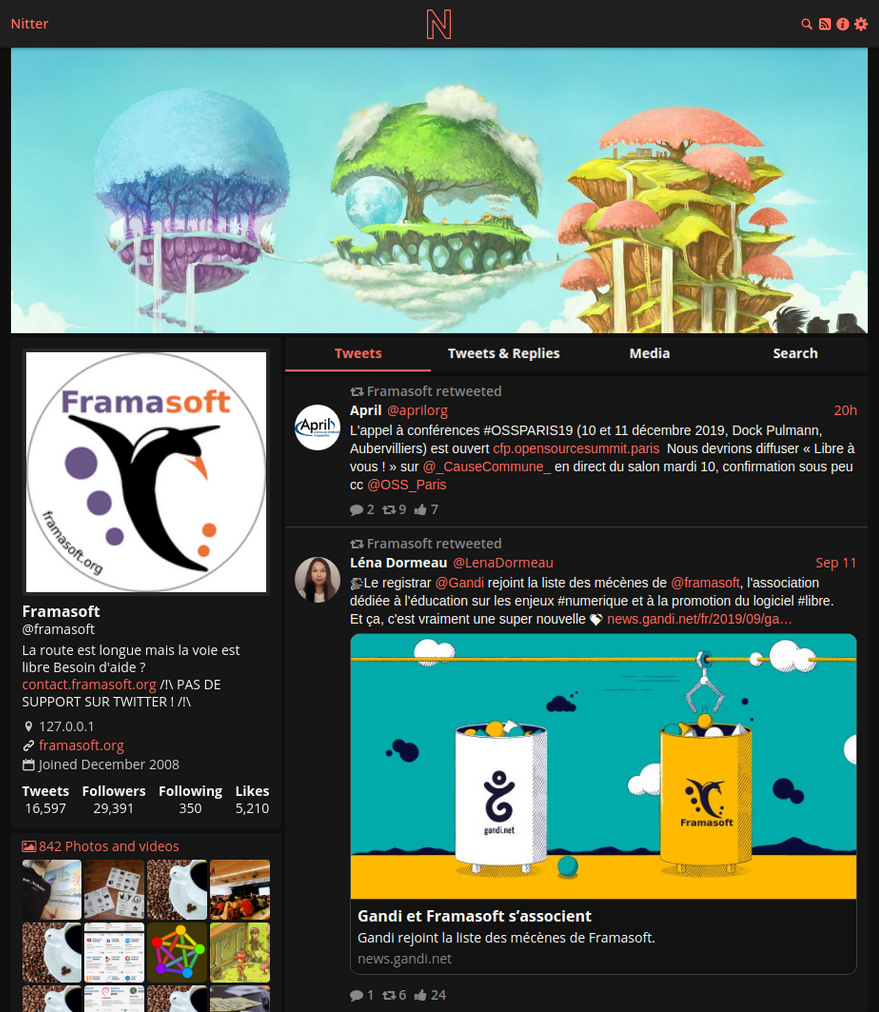
Screenshot
Installation
To compile Nitter you need a Nim installation, see nim-lang.org for details. It is possible to install it system-wide or in the user directory you create below.
To compile the scss files, you need to install libsass. On Ubuntu and Debian,
you can use libsass-dev.
Redis is required for caching and in the future for account info. It should be
available on most distros as redis or redis-server (Ubuntu/Debian).
Running it with the default config is fine, Nitter's default config is set to
use the default Redis port and localhost.
Here's how to create a nitter user, clone the repo, and build the project
along with the scss.
# useradd -m nitter
# su nitter
$ git clone https://github.com/zedeus/nitter
$ cd nitter
$ nimble build -d:release
$ nimble scss
$ mkdir ./tmp
Set your hostname, port, HMAC key, https (must be correct for cookies), and
Redis info in nitter.conf. To run Redis, either run
redis-server --daemonize yes, or systemctl enable --now redis (or
redis-server depending on the distro). Run Nitter by executing ./nitter or
using the systemd service below. You should run Nitter behind a reverse proxy
such as Nginx or Apache for
security reasons.
To build and run Nitter in Docker:
docker build -t nitter:latest .
docker run -v $(pwd)/nitter.conf:/src/nitter.conf -d -p 8080:8080 nitter:latest
A prebuilt Docker image is provided as well:
docker run -v $(pwd)/nitter.conf:/src/nitter.conf -d -p 8080:8080 zedeus/nitter:latest
Note the Docker commands expect a nitter.conf file in the directory you run them.
To run Nitter via systemd you can use this service file:
[Unit]
Description=Nitter (An alternative Twitter front-end)
After=syslog.target
After=network.target

[Service]
Type=simple

# set user and group
User=nitter
Group=nitter

# configure location
WorkingDirectory=/home/nitter/nitter
ExecStart=/home/nitter/nitter/nitter

Restart=always
RestartSec=15

[Install]
WantedBy=multi-user.target
Then enable and run the service:
systemctl enable --now nitter.service
Nitter currently prints some errors to stdout, and there is no real logging
implemented. If you're running Nitter with systemd, you can check stdout like
this: journalctl -u nitter.service (add --follow to see just the last 15
lines). If you're running the Docker image, you can do this:
docker logs --follow *nitter container id*
Contact
Feel free to join our Freenode IRC channel at #nitter, or our Matrix channel. You can email me at zedeus@pm.me if you wish to contact me personally.